> For the complete documentation index, see [llms.txt](https://help.palmstreet.app/llms.txt). Markdown versions of documentation pages are available by appending `.md` to page URLs; this page is available as [Markdown](https://help.palmstreet.app/seller/palmstreet-shipping-guide/order-fulfillment/how-to-fullfill-local-pick-up-orders.md).
# How to fullfill local pick-up orders
Palmstreet's Local Pick-Up feature allows buyers to collect orders directly from sellers who offer this service, saving both time and shipping costs. This option is ideal for buyers near the seller's meet-up location. For sellers, this feature provides a flexible and efficient fulfillment option.
{% hint style="info" %}
**Note:** The ability to directly complete pick-up orders is currently available only to **Business Plan Sellers**. Sellers on **non-Business Plans** will see a **“Send Order Completion Reminder”** button instead, which prompts the buyer to confirm the pick-up.
{% endhint %}
### Before You Start: Enable Local Pick-Up
#### Enable Local Pick-Up in Shop Policies
Before buyers can place local pick-up orders, you need to enable this option in your settings and LIVE setup:
1. Go to **Profile → Settings → Shop policies**.
2. Toggle on **Local pickup**.
#### Enable Order Pick-Up During LIVE Setup
When creating or editing a LIVE show:
1. Go to the LIVE setup page.
2. Select **Offer order pick-up** as an available option.
### **How to Complete Local Pick-Up Orders**
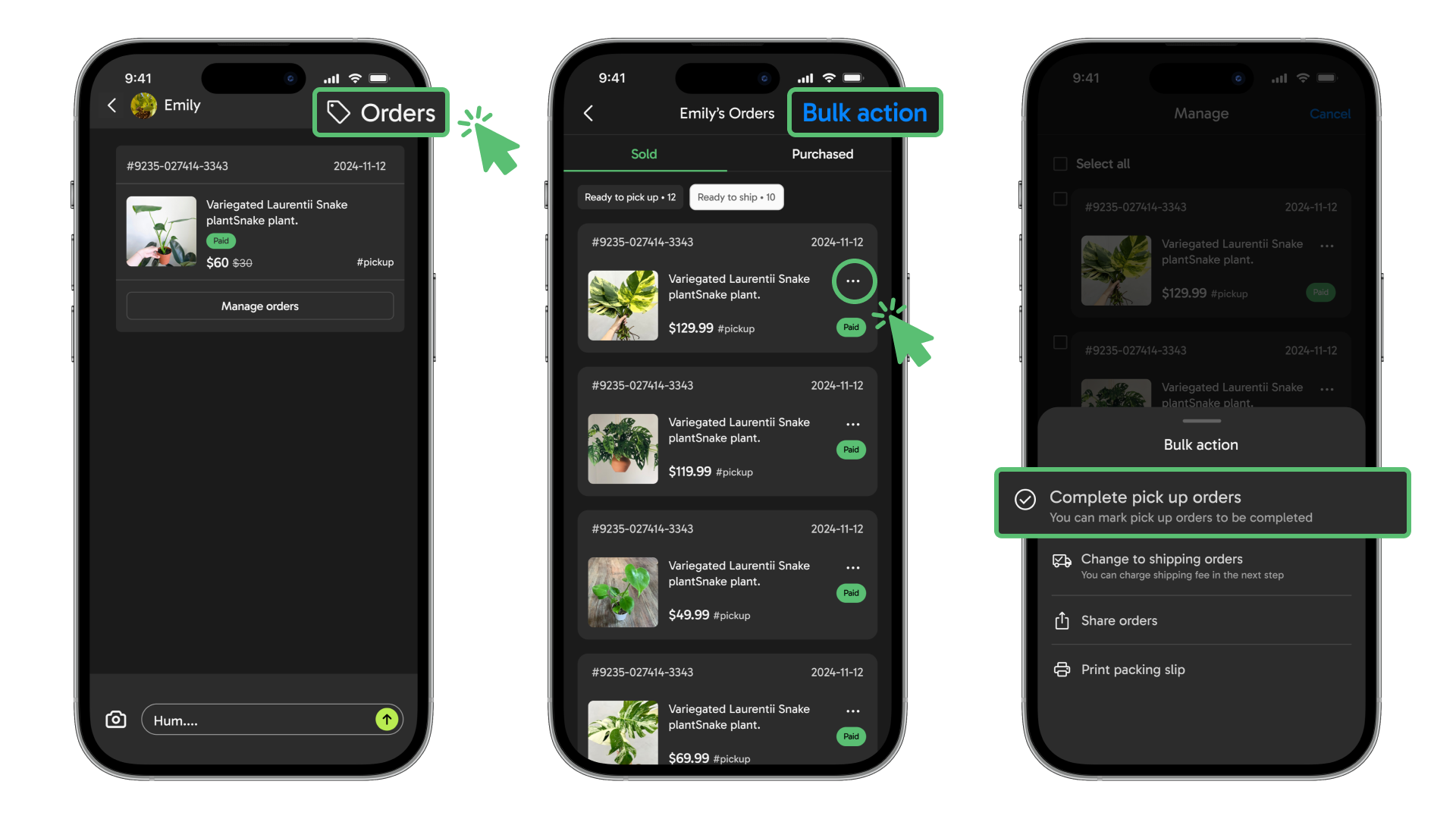
1. For orders already placed, access the specific buyer’s DM and click on **“Order”** to view all orders.
2. Select **“Bulk action”** to manage multiple orders, or click on the **“…”** to access a specific order.
3. Choose the **“Complete pick up orders”** button. (For Non-business plan sellers, the button will instead display **“Send Order Completion Reminder”**)
4. Follow the app’s guidance and upload any supporting images if needed. Once complete, the **“Order completed”** page will appear.
{% hint style="info" %}
**For Business Plan Sellers:** When a pick-up order is marked as complete, the order status will update to "Completed", and funds will be released immediately. The buyer will be notified.
**For Non-Business Plan Sellers:** Non-business plan sellers can prompt the buyer to confirm the pick-up. Funds will be released **48 hours** after the reminder, unless the buyer reports "Order not received". If the buyer confirms receipt, funds will be available immediately. If the buyer reports "Order not received", the order status will revert to "Created", and funds will not be released until the buyer confirms receipt. It is advisable to communicate with the buyer and retain evidence to resolve any potential disputes.
{% endhint %}
### **FAQs**
How does the buyer complete a local pick-up order with the seller?
The buyer may navigate to the order detail page to mark the order as picked up.
How does the buyer find the exact location for local pick-up?
The buyer should confirm the specific pick-up location with the seller.
What happens if the pick-up is missed or there are delays?
There is no specific time limitation, but it is recommended that the buyer pick up the items as soon as possible to avoid potential issues.