> For the complete documentation index, see [llms.txt](https://help.palmstreet.app/llms.txt). Markdown versions of documentation pages are available by appending `.md` to page URLs; this page is available as [Markdown](https://help.palmstreet.app/~/changes/249/seller/marketing/paid-promotion-reimbursement.md).
# Paid Promotion Reimbursement
Palmstreet’s **Paid Promotion Program** is an initiative designed to help sellers enhance LIVE sessions visibility and engagement through social media promotions. By supporting advertising efforts, this program makes it easier to attract larger audiences and drive meaningful sales results.
### How the Paid Promotion Program Works:
* **Promote on Social Media Platforms:** Boost upcoming LIVE sessions on leading platforms like Instagram, Facebook, TikTok, or YouTube. Ensure the post includes the date, time, and direct link to the Palmstreet LIVE session.
* **Reimbursement for Ad Payment:** Receive up to **$20** for each promotional post, helping to offset advertising expenses while increasing visibility and attracting larger audiences.
### Step-by-Step Guide to Maximize Promotion:
#### **1. Create a Social Media Post**
* **Include Essential Details**: Ensure the date, time, and a direct link to the Palmstreet LIVE session are included in the post.
* **Add a Compelling Call-to-Action:** Use phrases that encourage audiences to join the live session (e.g., “*Join my live stream on Palmstreet and check out my exclusive offers!*”).
* **Optional Enhancements**: Highlight giveaways, featured products, or special promotions to attract more attention.
#### **2. Boost the Post**
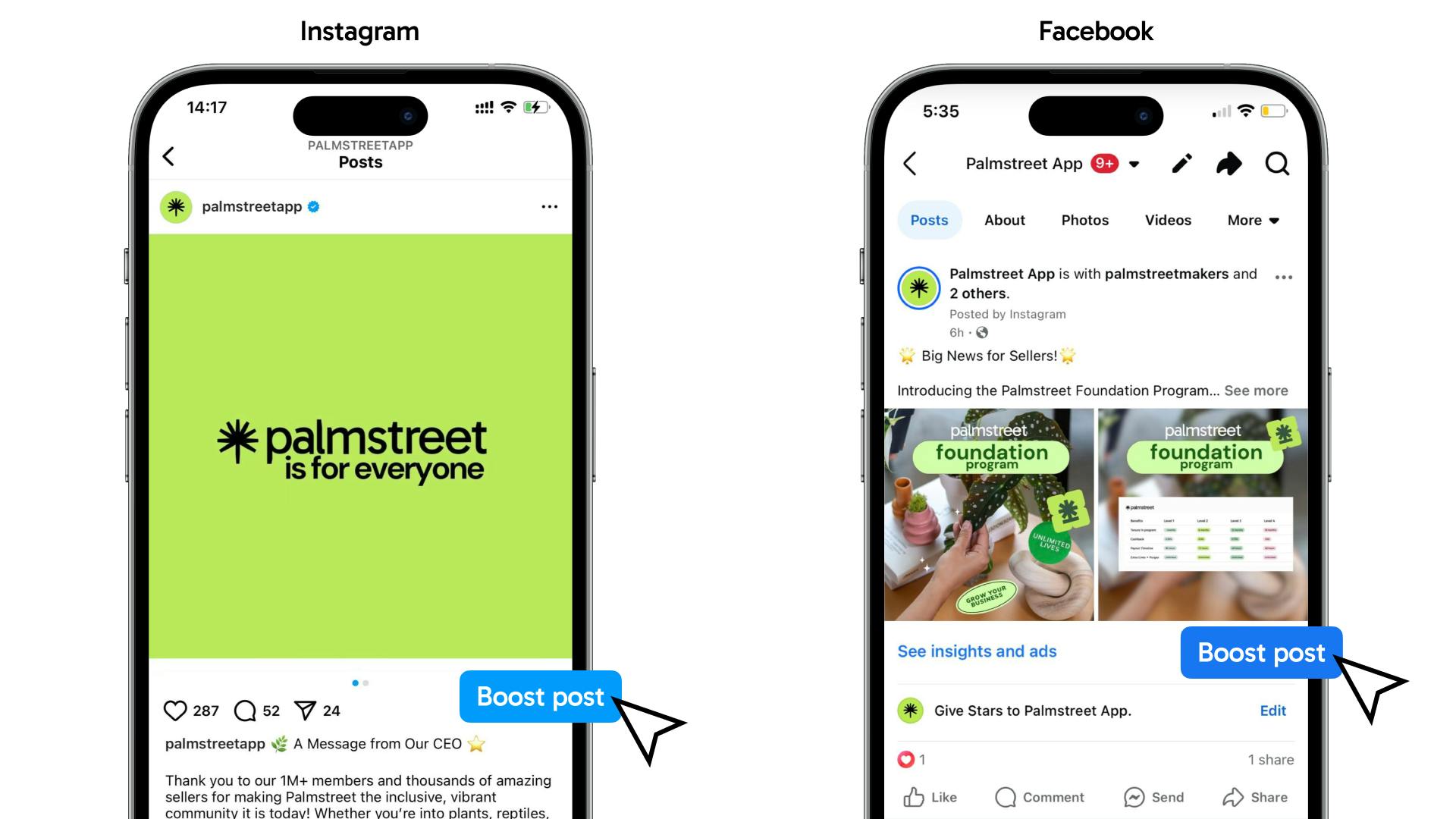
* **Select the Post to Boost:** Navigate to the post and click **“Boost post”.**
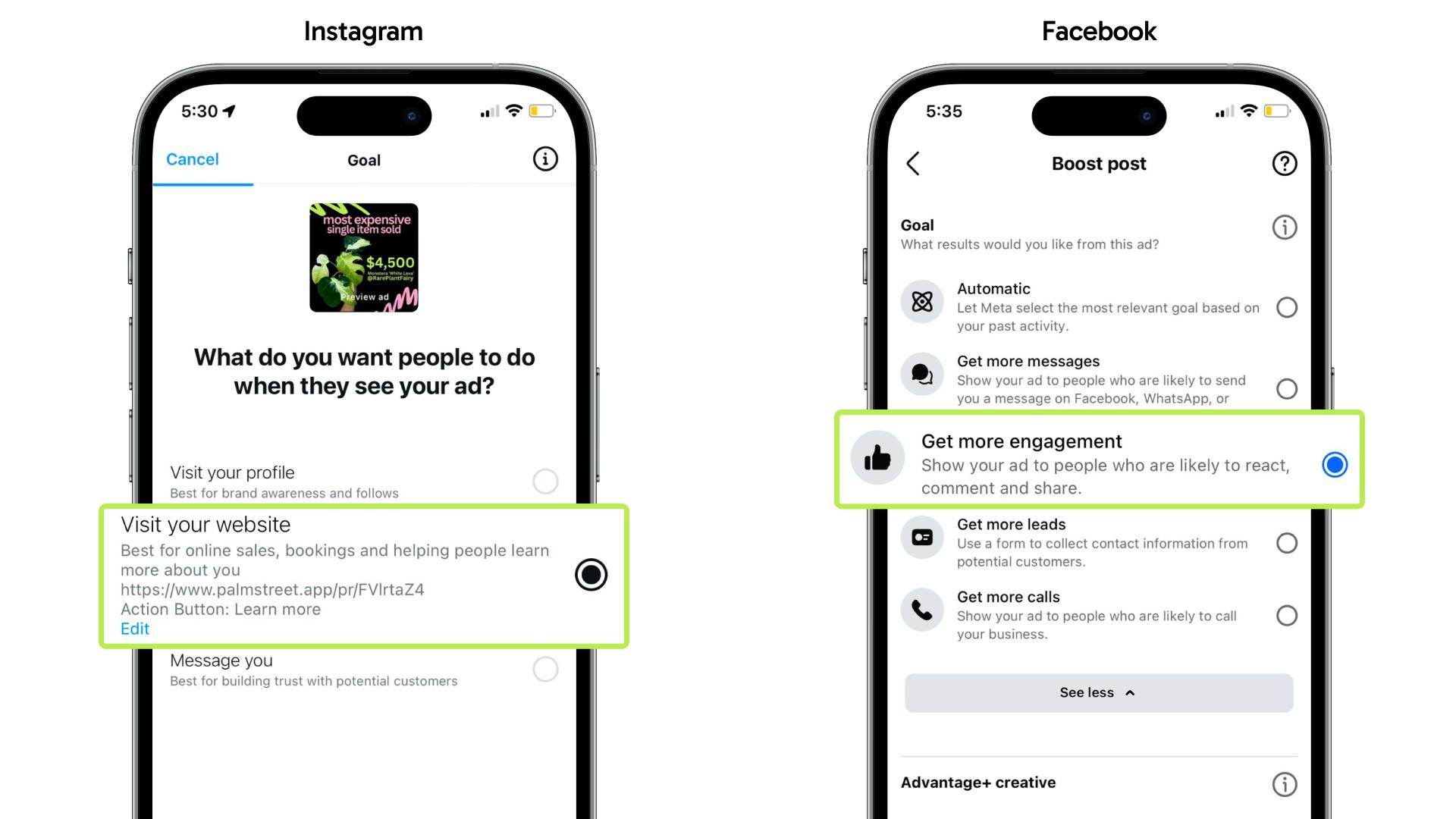
* **Set Up the Boost:** Choose objectives that enhance visibility or engagement. For example, on Instagram, select **“Visit website”** and paste your Palmstreet profile link; on Facebook, choose **“Get more engagement”** as the goal.
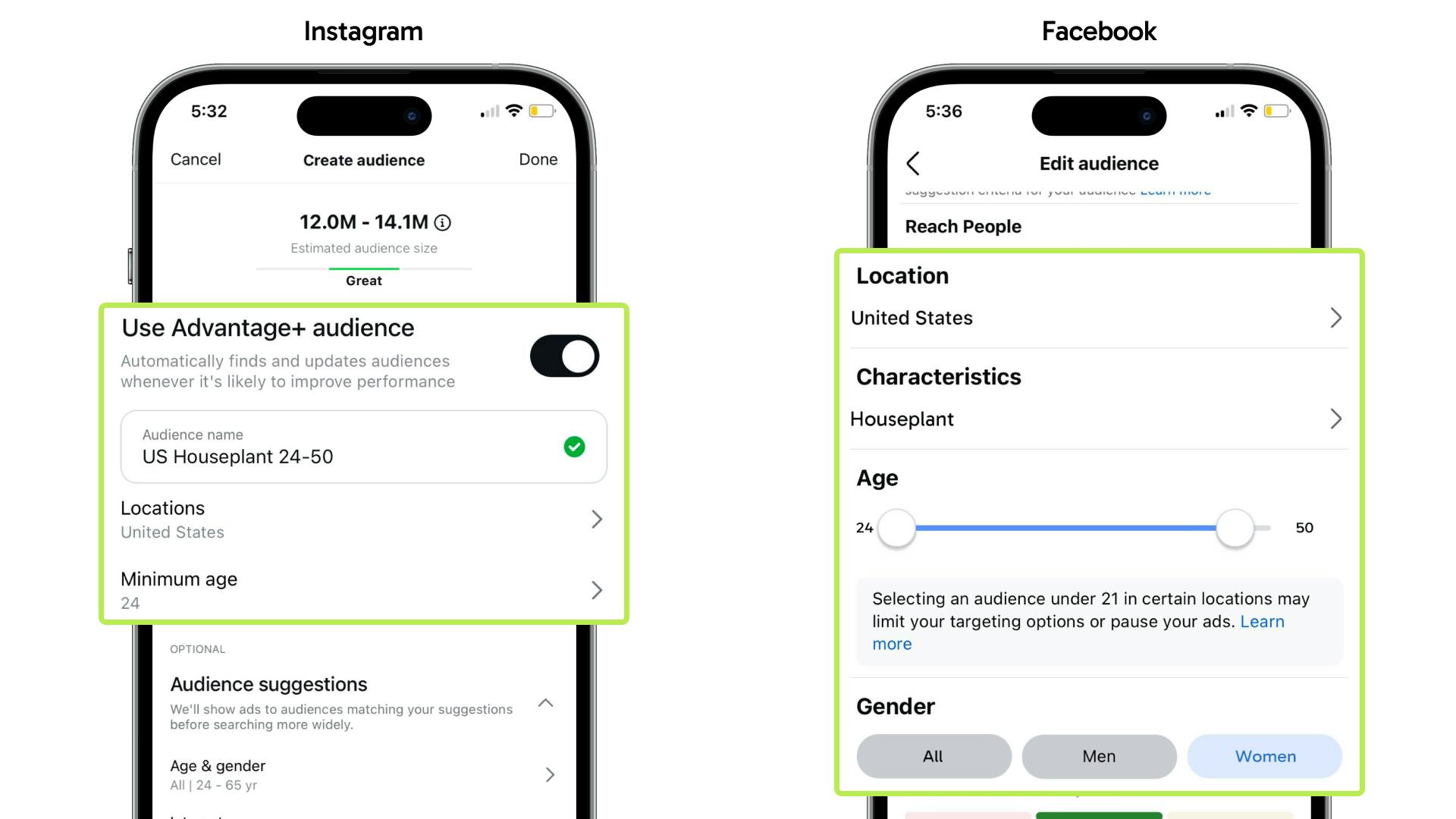
* **Set Ad Details:** Define key elements such as Goal, Audience, Budget, and Duration. The recommended audience is:\
Location = **United States**\
Interests = **Houseplant / Crystal / Reptile / Craft / Pottery**\
Age & Gender = **Female, 24 - 50 years**
#### **3. Track Ad Performance**:
* Monitor key metrics, such as ad spend, clicks, engagement, and live viewers, to evaluate the effectiveness of the promotion.
### Get Reimbursement:
* Submit a request through this link after the LIVE session:\
[Click to submit the reimbursement request](https://szur132wxww.typeform.com/to/s5cRL64S)
* Reimbursements will be processed on **Tuesday/Wednesday** each week. Once completed, a notification will be sent from @palmstreetsupport.
* Reimbursement (up to $20 per promotion) will be credited to the Palmstreet balance. Palmstreet reimburses up to **two paid promotions per week** for each seller to support promotional efforts.
### Maximize Profitability with Reduced Selling Fees
Achieving **100 saves** or more on a LIVE or Purge event qualifies sellers for an additional **0.5% selling fee deduction**. This incentive allows sellers to retain more of earnings, boosting overall profitability. This reduction is automatically calculated in the Palmstreet app, with no need to apply for it.
For detailed platform-specific guides on boosting posts, visit:\
[How to boost an Instagram post | Instagram Help Center](https://help.instagram.com/2090822074310288/?cms_platform=iphone-app\&helpref=platform_switcher)\
[How to boost posts on Facebook | Meta Business Help Center](https://www.facebook.com/business/help/347839548598012?id=352109282177656)\
[Promote your videos | YouTube Help Center](https://support.google.com/youtube/answer/141808?hl=en)\
[Use Promote to grow your TikTok audience | TikTok Help Center](https://support.tiktok.com/en/using-tiktok/growing-your-audience/use-promote-to-grow-your-tiktok-audience)
For more tips on crafting impactful social media posts, visit: [Social Media Guide](/~/changes/249/seller/seller-tools/palmstreet-seller-handbook/social-media-guide.md)
---
# Agent Instructions
This documentation is published with GitBook. GitBook is the documentation platform designed so that both humans and AI agents can read, navigate, and reason over technical content effectively. Learn more at gitbook.com.
## Querying This Documentation
If you need additional information that is not directly available in this page, you can query the documentation dynamically by asking a question.
Perform an HTTP GET request on the current page URL with the `ask` query parameter, and the optional `goal` query parameter:
```
GET https://help.palmstreet.app/~/changes/249/seller/marketing/paid-promotion-reimbursement.md?ask=&goal=
```
`ask` is the immediate question: it should be specific, self-contained, and written in natural language.
`goal` is optional and describes the broader end goal you are ultimately trying to accomplish on behalf of the user. GitBook uses it to tailor the answer towards what is most useful for that goal.
The response will contain a direct answer to the question and relevant excerpts and sources from the documentation.
Use this mechanism when the answer is not explicitly present in the current page, you need clarification or additional context, or you want to retrieve related documentation sections.